You type the job details into an email, then a spreadsheet, then QuickBooks. We connect the tools you already run so that happens once — and the invoice, the reminder and the weekly report take care of themselves.
That opens a short form. Send it and we come back with times for the call, usually the same day — nothing is scheduled until you pick one.
Prefer to talk? (407) 737-9933
One-off build, starting at
$690For your first automated process, scoped and quoted before anyone starts building.
Running & changes, from
$149/moMonitoring, fixes when a tool changes, and small adjustments as the work changes. Optional — you can take the build and run it yourself.
None of this is hard work. That is what makes it expensive. It is an hour here and twenty minutes there, every day, done by the person who should be selling or running the crew.
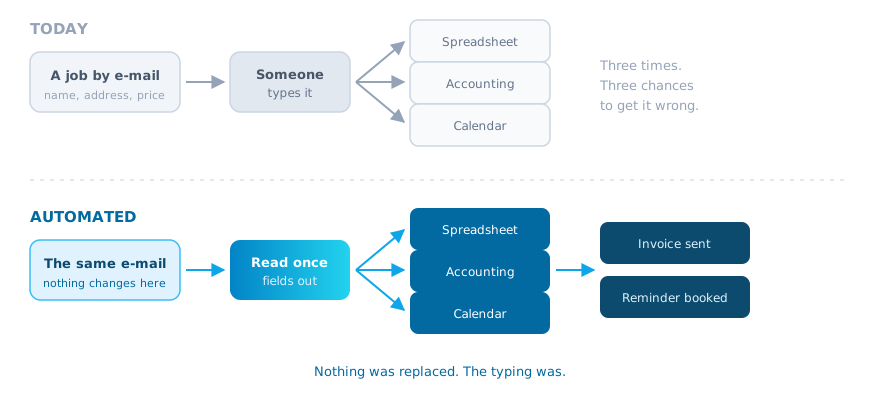
The job comes in by email. You copy it into the spreadsheet. Then you type it again into QuickBooks. Same name, same address, same price — three chances to get it wrong.
The work is finished but nobody rebuilt the quote as an invoice, so it sits for a week. You are lending money to your customers without meaning to.
Appointment reminders typed one at a time on Friday afternoon. A signature you have asked for twice. A supplier who has not confirmed. All of it lives in your head.
The same figures, pulled from the same three places, pasted into the same sheet, every single week. Nothing about it changes except the numbers.
Do the arithmetic on your own numbers. Say re-keying one job takes six minutes and you book forty jobs a week — that is four hours, before you count the reminders and the report. We write that calculation down for your business before you decide anything.
Same inbox, same software. Only the typing goes.
Swipe the diagram sideways to see it all
Nothing gets ripped out. Your QuickBooks stays your QuickBooks, your inbox stays your inbox. The automation sits on top of what you already run and moves information between it.
QuickBooks, Google Workspace, Outlook and Excel, Stripe and Square, the field-service app your techs use, plus plain email and SMS. Information entered once shows up everywhere it is needed.
No new software to learn, no migration.
Approve a quote and the invoice is built from it — same line items, same prices, your letterhead. Payment lands, the receipt goes out and the books are updated without anyone opening a document.
Numbering and terms stay exactly as you set them.
Appointments land in the right calendar, and the customer gets the reminder by text or email on the schedule you choose — the day before, the morning of, whatever your no-show problem actually needs.
Reschedules and cancellations update the calendar too.
A new customer, a service request, a job application, a patient form. It arrives as a proper record in your system, with the attachments saved to the right folder and the right person notified.
Works from your website, a link, or a QR code on paper.
The weekly numbers, the month-end summary, the crew's job list. Assembled from the same sources you pull from now and delivered to your inbox before you sit down.
Same layout every time, so you can read it at a glance.
Anything over a threshold goes to you for a yes or no in one tap. Signatures get requested and chased automatically. And when something is stuck — a quote unanswered for five days, an invoice unpaid past terms — you get told instead of finding out.
You decide what needs a human and what does not.
Five steps. You know the price and the plan before anyone builds anything.
30 minutes · free · no obligation
Ask for it with the form on this page or by phone, and we come back with times to choose from. You walk us through the job as you do it today, click by click. Which email, which tab, which spreadsheet, who signs off. We are not selling on this call; we are writing down the steps so we can count them.
Back to you within 2 business days
One page: the process as it runs now, the process as it would run automated, the hours a week it takes off your team based on your own numbers, what we need access to, and a fixed price. If the arithmetic does not justify the build, we say so and you owe us nothing.
Typically 1 to 2 weeks for a first process
We connect the accounts, build the flow and test it on copies of your real data, not made-up examples. Your live records are not touched during the build. You see it working before it is switched on.
5 working days, watched daily
It runs on live work while we watch every result. Real processes have exceptions — the customer with two addresses, the job that gets cancelled mid-week — and this is the week we find yours and handle them. Fixes in this week are included.
1 hour of training, plus written notes
We show your team how it runs, how to pause it, and what to do if something looks wrong. You get a plain-English document of what it does and where. The accounts and the automation are yours — if you stop working with us, it keeps running.
Two things, and they are the two things that decide whether this goes well.
Admin access to the accounts the process touches — accounting, email, calendar, the field app. We use your own permission settings, never a shared password, and access is revoked at handover if you want it revoked.
Someone who does the job today and can answer "what happens when…" questions. About two hours of their time across the whole build. Without them we would be guessing, and guessed automations break.
The second column is the one that saves arguments later, so we print it.
Any business with 5 to 50 people where one person is the bottleneck for paperwork. The examples below are illustrations of the kind of chore we mean — not accounts of past work.
Say you run a 6-person HVAC company. The quote your tech wrote on site could become the invoice the moment the customer approves it, instead of waiting for Friday.
A front desk that types reminder texts one by one could send them on a schedule, and new patient forms could arrive already filed against the right record.
Engagement letters that chase their own signatures, and a matter folder that creates itself with the right subfolders when a new client is opened.
A vehicle booked in could trigger the reminder, the approval request for extra work, and the receipt afterwards — without the service writer retyping the plate three times.
Proof of delivery landing straight in the customer's file, and an alert when a job has sat unassigned for longer than it should.
Donation receipts and thank-you letters going out the same day, and the board report built from the same figures every month instead of by hand.
Salons, restaurants, real estate, property management — the industry matters less than the shape of the chore. If you can describe it click by click, it can usually be automated.
Starting prices, published. Your exact figure is in the written plan before you commit.
One-off, for the first process
from $690
Each extra simple workflow: $590. Multi-step and complex processes are priced in the estimator.
Optional monthly care plan
from $149/mo
Running more than 3? Follow-up Plus is priced in the estimator. Month to month. Cancel and the automation still runs.
How many tools have to be connected
Whether a tool has a proper way to connect, or none
How many exceptions the process has
How many approval steps and who they route to
Records that are already tidy and consistent
A second or third process built after the first
Software subscriptions are billed to you by those companies at their own rates. We do not mark them up and we do not resell them.
A real, responsive, database-backed site — the clock starts the moment we have your content and you have approved the layout.
One place where jobs, customers, documents and staff all live, instead of six tabs.
For the steps that need reading and judgement — sorting email, drafting replies, pulling details out of documents.
No. That is the point. If your team runs on QuickBooks, Outlook and a shared spreadsheet, they keep running on QuickBooks, Outlook and that spreadsheet. The automation moves information between them. Nothing is ripped out and nobody has to learn a new system.
That is what the supervised week is for — it runs on live work while we check every result, so mistakes are caught by us, not by your customer. After that, anything that leaves your business can be set to wait for a human yes. You choose which steps run on their own and which ones ask first. And you can pause the whole thing in one click.
We need access to the tools the process touches, and only those. We use your own user and permission settings rather than a shared password, so you can see what we did and switch it off. We do not need your banking login to build an invoice flow. At handover you can revoke our access entirely and the automation keeps running.
Day to day, nobody maintains it — it runs. If a connected tool changes something on its side, that is the kind of repair the monthly plan covers. If you would rather not have a monthly plan, we hand over the documentation and you can call us hourly when you need us. You are not locked in either way.
A first process is typically one to two weeks of building, then the supervised week. So around three weeks from the call to the point where your team stops doing that chore. The written plan gives you the dates before you agree to anything.
That is not what this is built for. In a business of 5 to 50 people, the person doing the re-typing is usually the person you need on the phone with customers — or it is you, at 9pm. We automate the chore, not the job.
Then we tell you on the call or in the plan, and you have paid nothing. Some tools have no way to connect to them, and some processes have too many judgement calls to hand over. We would rather say that up front than invoice you for finding out.
Start with the free 30-minute call. We map it, count the hours, and put a plan and a price in writing. If it is not worth building, we will tell you that too.
Tell us the chore in the form. We reply with times, usually the same day. Want a time now instead? Call us.
Orlando, FL · support@cyrusmanagementgroup.com · English & French
Step 1 of 2

